Businesses in ChatGPT: What OpenAI's New Business Hub Actually Means for Marketers
On November 10, 2026, OpenAI gave businesses something they have never had inside ChatGPT: a way to claim their own listing.
The new program is called Businesses in ChatGPT. Most coverage so far explains what it is and how to sign up. That matters, and we cover the steps below. But the bigger story is what this launch resembles.
It looks a lot like the early days of Google Business Profile. Back then, the businesses that claimed and maintained their listings early built an advantage that latecomers spent years trying to close. Businesses in ChatGPT is the first permanent place for brands to manage their presence inside AI search. Treating it as just one more listing to claim misses the point.
What Is Businesses in ChatGPT, and Why Does It Matter Now?
Businesses in ChatGPT is a new OpenAI program, currently in beta, that lets companies claim their business inside ChatGPT, keep their information up to date, and see how people engage with them there.
One naming note before going further. Business Hub is not the same thing as ChatGPT Business, OpenAI's paid plan for teams. Business Hub is the free dashboard where you claim and manage your company's public profile. Buying ChatGPT Business seats does nothing for your profile.

The November 10, 2026 Launch at a Glance
| What | Details |
|---|---|
| Launched | November 10, 2026, in beta |
| Cost | Free at launch, per Digiday's briefing with OpenAI |
| Who can claim a profile | Eligible businesses with a website, wherever ChatGPT is available |
| Who can build a Business Agent | Eligible U.S. ecommerce and online service businesses |
| Where you manage it | Business Hub, in the ChatGPT sidebar |
The Two Parts of the Beta, Business Hub and Business Agents
The launch has two pieces, according to OpenAI:
- Business Hub is where you claim your business, verify it, update key details, add product information, and view basic performance data.
- Business Agents are AI assistants that answer customer questions about your products and policies inside ChatGPT. Only some businesses can build one today.
The Scale Behind It, 1.2 Billion Weekly ChatGPT Users
OpenAI says ChatGPT now reaches
1.2 billion people each week, and that more of them use it to discover products, compare options, and make decisions. Your customers may already be asking ChatGPT about businesses like yours. Until now, you had no direct way to shape the information it used to answer them.
Why This Is the Google Business Profile Moment for AI Search
If you remember when Google first let businesses claim their listings, this launch should feel familiar. It is the clearest sign yet that AI search is building the same kind of infrastructure.
What GBP Did to Local Search in the 2010s
Before Google Business Profile (then Google My Business), Google pieced together business details from around the web, and those details were often wrong. Once businesses could claim their listings, the profile became the official source. Over the following years, Google kept adding features: reviews, photos, posts, messaging, booking. Today, as we explain in our guide to the Google 3-Pack, the profile is one of the most important factors in local search.
Businesses that claimed early had cleaner data, more reviews, and years of history when the profile started to matter most.
What Is the Same and What Is Different
What's the same: a business proves it owns its listing, then takes responsibility for keeping the facts accurate. The platform gets better information, and customers get better answers.
What's different: ChatGPT doesn't show a ranked list the way Google Maps does. It writes an answer, drawing on many sources across the web. Your profile is one input into that answer, not the answer itself. And Business Hub only covers ChatGPT. It doesn't affect Google, Gemini, Perplexity, or other AI tools.
To be clear, this is an added channel. It doesn't replace your Google Business Profile, local SEO, or search strategy. Google is still where most local searches happen.
The Early-Mover Precedent
OpenAI says it plans to expand the program to
more markets and business categories over time. If it follows the Google Business Profile pattern, features will build on top of the claimed profile. Businesses that claim now will have verified access, clean data, and a few months of insights when those features arrive.
What Business Hub Actually Does (and What It Does Not)
The most useful thing you can know about Business Hub is where its limits are. That is what separates a smart plan from wasted effort.
What You Get, Profile Claim, Product Feeds, and Aggregated Insights
Once you claim and verify your business, OpenAI's setup guide says you can:
- Update your business profile, so ChatGPT has accurate, current details about you.
- Add a product feed with pricing and availability, either by connecting Shopify or uploading a file.
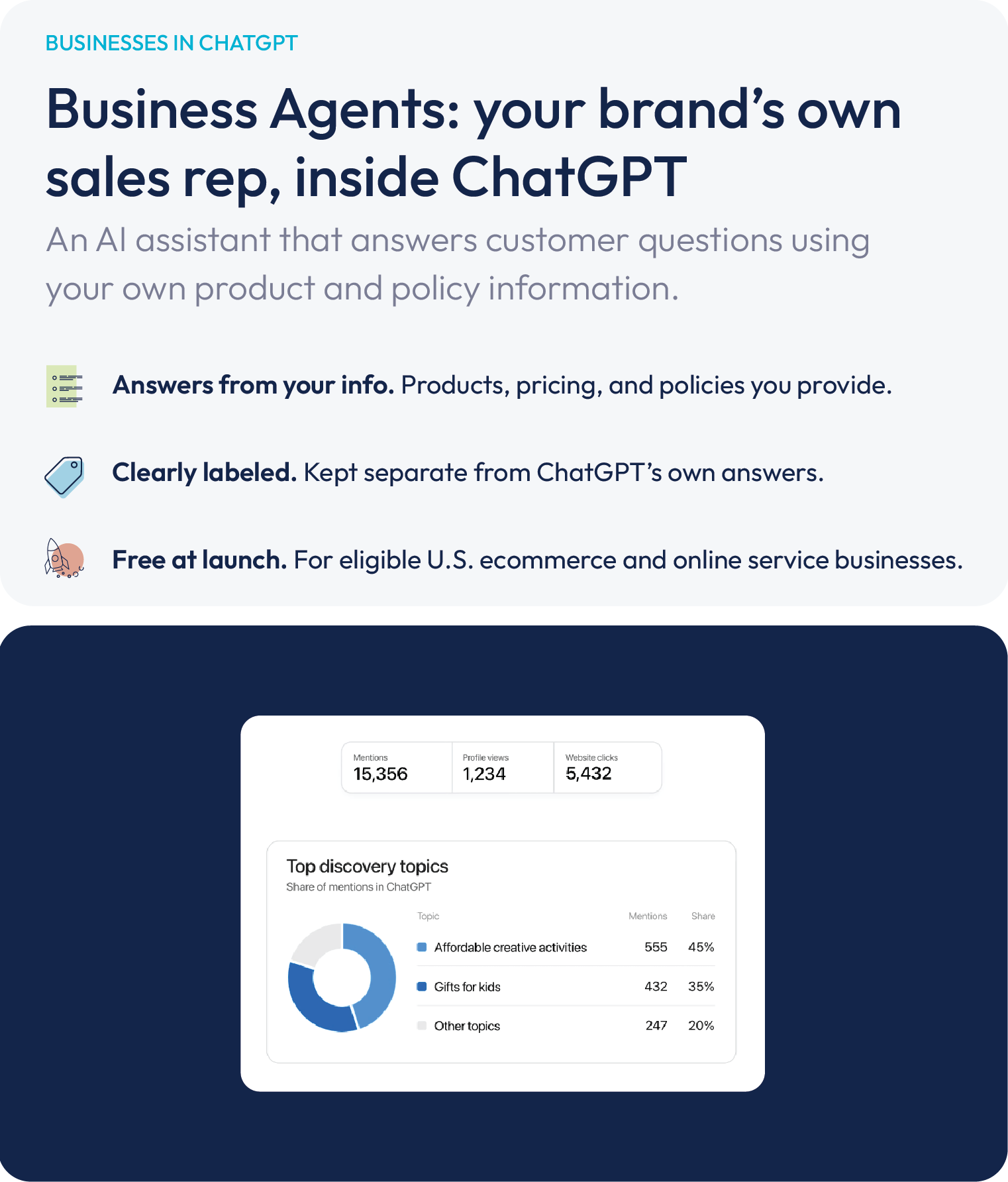
- See basic insights, including how often ChatGPT mentions you, how many people click through to your website, and the common topics in conversations where your site is cited.
Those insights are the first data ChatGPT has ever given businesses about themselves. They do come with limits. Numbers are grouped together and only appear once there's enough activity to meet OpenAI's thresholds, so smaller businesses may see little at first. OpenAI says it doesn't share individual user conversations with businesses.
What OpenAI Explicitly Does Not Promise
OpenAI is direct about this. Claiming your business does not guarantee higher placement or sales, and ChatGPT will keep making its own independent recommendations and comparisons. OpenAI's setup guide adds that advertising doesn't influence those answers either.
OpenAI's vice president of monetization, Benji Shomair, told Digiday that claiming
shouldn't change how often a business appears, though more complete information could help ChatGPT surface a company in more relevant conversations.
Why Claiming Is Not the Same as Ranking
This is the most common misunderstanding we expect to see. Claiming your profile is like making sure your phone number is correct in the directory. It helps people who find you. It doesn't make more people find you.
What earns a mention in ChatGPT is still what earns attention across the web: a strong website, credible reviews, coverage on trusted sites, and clear information about what you offer. That's the work we describe in our approach to AI search optimization. Your Business Hub profile makes sure that when ChatGPT does mention you, it gets the facts right.
How to Claim Your Business in ChatGPT (The Short Version)
To claim your business in ChatGPT, sign in to ChatGPT, open Business Hub from the sidebar, find your business, and verify that you own it by phone, email, website domain, or Shopify. Then complete a separate identity check through Persona to unlock editing and insights. These steps follow OpenAI's setup guide.
You'll need to be the owner or an authorized representative, and your business needs a website.
Sign In and Open Business Hub
Sign in to ChatGPT with the account that should own the business profile, then select Business Hub in the sidebar. Use a company-controlled account, not a personal one that could leave with an employee.
Search Your Business and Start the Claim
Search for your business by name and select it from the suggestions. If it isn't listed, you may be able to add it, depending on your business type.
Verify by Phone, Email, Domain, or Shopify
ChatGPT offers one or more ways to prove you control the business. You'll only see the options that apply to you:
- Business phone: receive a code by text or automated call.
- Business email: receive a code at the business email address.
- Website domain: add a short code (a TXT record) to your domain settings. Your web developer can do this in minutes.
- Shopify: connect your Shopify store.
OpenAI then reviews and approves your claim.
Pass Persona Identity Verification
An approved claim only gets your business into Business Hub. To edit your profile, add products, see insights, or build an agent, you must also complete identity verification through Persona, a third-party verification service. Have a government ID, business registration details, and proof that you can represent the business ready. The blue verified check appears once Persona approves you.
Update Your Profile and Connect a Product Feed
Review every detail ChatGPT has about your business and correct anything that's out of date. If you sell products, connect your Shopify store or upload a product file with current prices and availability.
What About Business Agents, and Who Qualifies?
A Business Agent is an AI assistant that answers customer questions inside ChatGPT, using your own product and policy information. Think of it as a virtual sales rep that only talks about your business.
Current Eligibility for US Ecommerce and Online Service Businesses
Right now, Business Agents are only available to eligible ecommerce and online service businesses in the United States, and only after you claim your profile. Local service businesses, such as plumbers or dental practices, can claim a profile but can't build an agent yet. Publishing an agent is free at launch, and businesses can't bring their own outside AI agent.
How Business Agents Appear and How They Are Labeled
OpenAI says conversations with a Business Agent are clearly labeled and kept separate from the customer's original ChatGPT conversation. They're also kept distinct from ChatGPT's own independent answers, so customers can tell when they're talking to a brand.
The Paid Path Through ChatGPT Ads and Sponsored Agents
Businesses can also pay to promote their agent and use it as the destination for ChatGPT Ads. This builds on Sponsored Agents, which OpenAI began testing with selected advertisers in September. OpenAI says paying for ads doesn't change how often ChatGPT recommends a business in its regular answers.
What Marketers Should Do This Week
You don't need a big plan to get started. Three steps will put you ahead of most businesses.
Check How ChatGPT Currently Describes Your Business
Ask ChatGPT a few questions a customer might ask: what your business does, where you're located, what you charge, and how you compare with competitors. Write down anything that's wrong or missing. This becomes your baseline and your list of fixes.
Claim Your Profile Even If You Are Not Sure How You Will Use It
Claiming is free and takes less than an hour for most businesses. Even if you don't plan to use the insights or agents yet, claiming secures your listing and lets you correct inaccurate information. If you work with an agency, have your company's own account hold the claim and add the agency as a collaborator, the same way ownership should work with Google Business Profile.
If you have multiple brands or locations, note that each brand is managed separately, and claiming a main brand doesn't automatically claim its locations.
Watch for Eligibility Expansion
OpenAI calls this beta an early step. If you're a local business or outside the U.S., you can't build an agent yet, but that's likely to change. Claim your profile now so you're ready when it does.
How Businesses in ChatGPT Fits Into Your Broader AI Visibility Strategy
Business Hub is one piece of a larger picture. Your profile makes sure ChatGPT has accurate facts. Everything else you do online determines whether ChatGPT mentions you in the first place.
That means the fundamentals still matter. A well-built website, strong reviews, and coverage on trusted sites help you show up in Google and in AI tools alike. As we've written before, SEO isn't dead, it's just getting smarter. And your Google Business Profile and local SEO remain essential, since Google still handles most local searches.
The businesses that do best will treat these channels as one connected system, not separate projects. We explore that idea in our post on holistic marketing in the Google ecosystem, and the same thinking now extends to ChatGPT.
How RivalMind Is Approaching It
For our clients, we're starting with the basics: checking what ChatGPT says today, claiming profiles under the client's own account, and correcting inaccurate details. Then we connect it to the broader work of earning visibility across search and AI.
If you'd like help claiming your profile or building an AI visibility plan, contact RivalMind or explore our digital marketing services.
FAQs
What Is Businesses in ChatGPT?
It's an OpenAI beta, launched November 10, 2026, that lets companies claim their business inside ChatGPT, keep its details current, and see basic insights. Eligible U.S. businesses can also build a Business Agent.
How Do I Claim My Business in ChatGPT?
Sign in to ChatGPT, open Business Hub from the sidebar, find your business, and verify it by phone, email, website domain, or Shopify. Then complete a Persona identity check to unlock editing and insights.
What Is a ChatGPT Business Agent?
It's an AI assistant that answers customer questions inside ChatGPT using your own product and policy information. Conversations with it are labeled so customers know they're talking to your brand.
Who Qualifies for a ChatGPT Business Agent?
Right now, only eligible ecommerce and online service businesses in the U.S., and only after they claim their profile. OpenAI plans to expand to more markets and categories.
Does Claiming a Profile Improve My ChatGPT Visibility?
No. OpenAI says claiming doesn't guarantee higher placement or sales. It helps ChatGPT get your details right when it does mention you.
Is Business Hub Free?
Yes, claiming a profile and publishing a Business Agent are free at launch. Promoting an agent through ChatGPT Ads is paid.
Can My Agency Manage My Business Hub Profile?
The person claiming must be an owner or authorized representative. The safest setup is for your company's account to hold the claim and add your agency as a collaborator.
How Is Business Hub Different From Google Business Profile?
Both let you claim and manage your business listing. But Google Business Profile shapes a ranked list in Google search and Maps, while Business Hub feeds information into ChatGPT's written answers. They work best together, not as replacements for each other.
Will ChatGPT Keep Describing My Business If I Do Not Claim It?
Yes. ChatGPT may show information about your business whether or not you claim it. Claiming lets you make sure that information is accurate.
Looking for more organic website traffic?
Welcome to RivalMind. Our purpose is to help your business thrive. We are a digital marketing agency that offers SEO, PPC, Web Design, Social Media and Video Solutions as tools to our clients for online business development and growth.
Contact us today to get started!
Blog Contact Form
We will get back to you as soon as possible.
Please try again later.